Inspire by the Colorful Clan post, I did a photo pedigree chart for Fable. As you can see I have two grandparents that I don’t have photos for. I found someone who has puppy photos of Laramie but I’m hoping to find an adult photo. I’m really happy with how it came out. I’ve uploaded an InDesign CS6 template here for your personal use. It shouldn’t be too hard to adapt it to humans. I’d love to see your project if you use the template.
Category Archives: Family Trees
Family Trees: hand print quilt
This family tree made of hand prints would make a priceless gift. So if you know how to sew (or know someone who is willing) this would be an incredible project. My parents 60th wedding anniversary is coming up next year. Something like this would be perfect. Click on the photo above for more photos and how Kimbo went about making this quilt. I’m filing this idea away for next October.
Family Trees: 3D colorful family tree
With spring around the corner, this would be a fun family project. It would make a great time to get the kids involved in a hands on activity. Click on the photo above for step by step tutorial. I also think it would also be fun to put together a kit and send to grandkids that are far away.
Family Trees: scrabble style
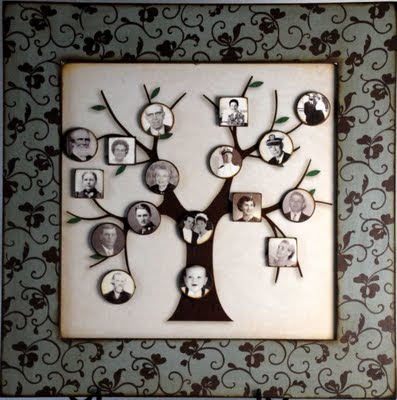
Family Trees: magnetic
This is a great idea for a growing and changing family. With the photos on magnets it is easy to rearrange to accommodate new members. It would also make a fun game to see if family members know who goes with who in your family tree. I didn’t find any directions for making the magnetic family tree. The original idea was on StoriesByMe’s blog for a product they sold but they don’t seem to be in business anymore. So you are on your own. But I think the concept is good and it should be too hard to figure out. If you figure it out or find a tutorial let me know and I’ll add it here.
Family Trees: a colorful clan – InDesign Template
version of the colorful clan for Apex (the first puppy we raised for GDB)
A couple of weeks ago I did a post on colorful clan family tree for a 4″ x 12″ panoramic frame. I’ve put together a simple Adobe InDesign template to recreate the one from Parents.com. As I was working on it I realized that I didn’t need to have different colors of paper. With a color printer I could just print my background color.
For a sample I decided to show Apex’s (the first puppy we raised for Guide Dogs for the Blind) family tree. As you can see I don’t have all the birth dates and I don’t have any death date though some of these dogs have certainly passed away. But I though it would work to show what the template is like. Of course when you open the template up in InDesign you will be able to customize anything you would like from the fonts to the background colors.
You can download the Panoramic Clan Template here from Dropbox. When you open it up in Dropbox it will look like crazy gobbledegook. But once you save it to you computer and open it in InDesign it will work fine. I made this template in InDesign CS6. Let me know if you have problems or suggestions. I’m hoping to make more templates this coming year.
Family Trees: tree of hearts
This Family Tree of Hearts is customizable from PersonalCreations.com. Though you have no control over the arrangement of the hearts on the tree or which heart the names appear on, this would make a lovely addition to any home. Click on the image above to get the details.
If you have the time and desire you can paint your own version. Theirs is on canvas so you could pick up a pre-stretched canvas and get to work. Or you could use wooden planks to replicate the look of the background. Doing it your self you could put the hearts in a more traditional family tree arrangement, though I can see some advantages of the random approach. Doing it yourself would make it possible to add more hearts as new members join the family.
Family Trees: a colorful clan
A project doesn’t have to be complicated to be effective. This idea from parents.com is easy to put together with a panoramic frame, your printer and some colored paper. Click the photo above for more detailed directions. If you register on their site they have a cutting template too. But I’ll make it my goal to put together an InDesign template to make it super easy to put in your families names. Watch for it on Thursday.
I think this format would also lend its self to putting photos in place of the colored paper. Maybe all in black and white or sepia tone. It could be fun with tightly cropped photos too. Some great possibilities with this. I’ve got to try this out asap.
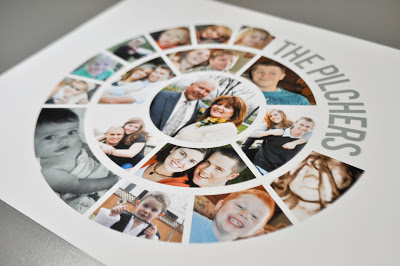
Family Trees: family photo diagram
Sometimes the best ideas come when you are solving a problem. This is one of those ideas. Loni Harris wanted to send her brother a family photo but the most recent one was a couple of years out of date and missing some new members. So she came up with this circular format showing three generations of her family. It is a brilliant solution and very adaptable do different numbers of children. Her readers loved it so much that she now makes custom version in her Etsy shop. At the time of writing this post she is taking a break from her shop. Hopefully it will be back up soon.
She did her’s project in Photoshop and Illustrator. I think I could do this pretty easily in InDesign. Maybe I’ve got myself a new project for Mother’s day or my Mom’s 92nd birthday. I’ll be sure to let you know how it comes out.
I’ve decided to regularly share ideas I find for family trees, so stay tuned. More to come over the coming weeks and months.