Family Tree: Panaramic Photo Pedigree Chart

Fable’s pedigree

Inspire by the Colorful Clan post, I did a photo pedigree chart for Fable. As you can see I have two grandparents that I don’t have photos for. I found someone who has puppy photos of Laramie but I’m hoping to find an adult photo. I’m really happy with how it came out. I’ve uploaded an InDesign CS6 template here for your personal use. It shouldn’t be too hard to adapt it to humans. I’d love to see your project if you use the template.

50 Button Crafts: idea #13 – button family tree

button tree via Bonkers About Buttons

Got a box or jar full of buttons carefully saved by your mother or grandmother? For 2015 I’m in search of great ways to put those buttons to use. Here is this week’s idea:

While this tree was a temporary creation of an Ebay seller, the idea is a good one using buttons from your stash to make a family tree. I can imagine adding small tags to the buttons for names. Another option would be to write names directly on the buttons. That method would make it very easy to add more names to the tree as your family expands. Lots of possibilities with this idea.

It would be a good idea to document where the buttons for your project came from and any relevant stories or information about that person or family. If you are looking for more button crafts, check out my Pinterest board.

Family Trees: hand print quilt

Family Tree Quilt from agirlandagluegun.com

This family tree made of hand prints would make a priceless gift. So if you know how to sew (or know someone who is willing) this would be an incredible project. My parents 60th wedding anniversary is coming up next year. Something like this would be perfect. Click on the photo above for more photos and how Kimbo went about making this quilt. I’m filing this idea away for next October.

Family Trees: 3D colorful family tree

3D Family Tree from eHow.com

With spring around the corner, this would be a fun family project. It would make a great time to get the kids involved in a hands on activity. Click on the photo above for step by step tutorial. I also think it would also be fun to put together a kit and send to grandkids that are far away.

Family Trees: magnetic

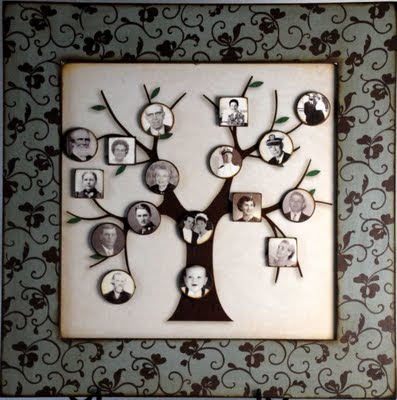
magnetic family tree from VisitingTeachingSurprise & StoriesByMe

This is a great idea for a growing and changing family. With the photos on magnets it is easy to rearrange to accommodate new members. It would also make a fun game to see if family members know who goes with who in your family tree. I didn’t find any directions for making the magnetic family tree. The original idea was on StoriesByMe’s blog for a product they sold but they don’t seem to be in business anymore. So you are on your own. But I think the concept is good and it should be too hard to figure out. If you figure it out or find a tutorial let me know and I’ll add it here.

Family Trees: a colorful clan – InDesign Template

Apex panaramic clan family treeversion of the colorful clan for Apex (the first puppy we raised for GDB)

A couple of weeks ago I did a post on colorful clan family tree for a 4″ x 12″ panoramic frame. I’ve put together a simple Adobe InDesign template to recreate the one from Parents.com. As I was working on it I realized that I didn’t need to have different colors of paper. With a color printer I could just print my background color.

For a sample I decided to show Apex’s (the first puppy we raised for Guide Dogs for the Blind) family tree. As you can see I don’t have all the birth dates and I don’t have any death date though some of these dogs have certainly passed away. But I though it would work to show what the template is like. Of course when you open the template up in InDesign you will be able to customize anything you would like from the fonts to the background colors.

You can download the Panoramic Clan Template here from Dropbox. When you open it up in Dropbox it will look like crazy gobbledegook. But once you save it to you computer and open it in InDesign it will work fine. I made this template in InDesign CS6. Let me know if you have problems or suggestions. I’m hoping to make more templates this coming year.

Ancestry by Heir Line

What a fun video about family history. At first it was rather hum-drum but then it takes a fun twist so don’t give up.


Ancestry by Heir Line's avatarAncestry by Heir Line - Blog Page

http://youtu.be/9PSgu40l9is

The only Heir Line that whisks you away into your past 🙂

Visit www.heir-line.co.uk for more information about our professional, personalised services.

View original post

Family Reunions in the Digital Age

from FamilySearch newsletterI found this information in the FamilySearch User Newsletter for June 2013, but it is also on their blog in this post by Matt Wright. He has some great ideas for family reunions using modern technology to its best advantage.

When my ancestors took this family reunion photo in 1932, they didn’t have our generation in mind as much as they did what was for lunch, where little Melvin had disappeared to, and what time they might need to leave to get home. But, I’m so glad they took the time—this snapshot has turned into a valuable piece of my family story.

When you get together for your yearly family reunion this summer, what will you do to make sure future generations have access to important family memories? FamilySearch Photos and Stories provides tools to help you capture, preserve, and share your family memories for today and generations to come.

Read on for some general reunion photo ideas as well as tips for using Photos and Stories to add some flair to your reunion. If you haven’t had a chance to use Photos and Stories, you should try it out. We recently added an automated search that will find photos of your ancestors [VIDEO]. Simply click the blue button on the Photos page to log in and see what photos others have added.

General Ideas

There are certain photo-related activities that could or should happen at any family gathering. Here are some ideas.

  • Take a group photo—Kind of a no-brainer, but so important to capture the people at the event for future generations.
  • Photo slideshow—Set up a laptop or television with a looping slideshow of favorite family photos, from as many people as you can get to contribute. Make sure the photos are uploaded to FamilySearch.org so that family members can see the photos when they get home.
  • Photo name tags—get head shots from each attendee (or from the ancestor they descend from for larger events) and place the photos on name tags with their name to make sure everyone remembers names!

Photos and Stories

Many family reunions or get-togethers are held in buildings or other locations with Wi-Fi. Some family members can bring an Internet Hot Spot. Whatever the case may be, if you have it available, take advantage of the access to make some serious progress in documenting your family story on FamilySearch.

  • Identify photos—Work with individuals or groups to identify the people in photos that have already been uploaded. My family reunion picture above is a great example—I don’t know everyone in the photo, but working together we can likely fill in many of the blanks.
  • Give time to explore—Have a few laptops available for family members to explore the Family Tree fan chart, photos, and stories at their own pace. They can add stories to photos and may even help tag previously unknown people in photos they see.
  • Take time to record—A hand held digital audio recorder or video recorder can capture individuals telling stories and sharing memories that can be preserved and cherished by those to come.

Gather and Digitize

Even if you don’t have access to the Internet you can still grow your family’s Photos and Story collection and experience the magic of ancestral photos.

  • Assign a Photo Chairperson—As part of your reunion planning, assign someone to manage the gathering and display of family photos. This person can organize an effort to have family members bring photographs to the reunion to be digitized or copied so you can upload them to FamilySearch.
  • Set up a scanning station—This is easily done with a laptop and portable scanner. Once scanned, you have a copy to upload to FamilySearch. This can get people motivated and trained to add more photos when they return home. Get the word out as far ahead of the event as possible and provide reminders so that people remember to bring their photos.
  • Show a family presentation—This can happen quite naturally during an already scheduled family meeting. Even without Internet, you can present a slide show with screen captures of what family information is already available on FamilySearch.
  • Set up a photo identification table—Print out photos of unidentified people on inexpensive paper print and have a table full of family photos for older relatives to annotate who is in each photo. Transfer the information to FamilySearch to be preserved.
  • Reunion web page—Create a family reunion page in FamilySearch Photos and Stories and share it through email or social media.

However you approach photo sharing at your reunion you’ll be glad you did. The photos and stories of our ancestors can help create a connection that bridges generations.

Thanks Matt for this inspiring ideas. Are you having a family reunion this year?


Geneaquilts

I came across this new (at least to me) way to visualize complex family trees. It looks very interesting. I’d love to put my puppies pedigrees in here to better see their relationships. All of them have at least one common ancestor in less than five generations. I’ve always wanted a way to visualize their relationships better. I think this might do it. I’m going to have to try this out soon.

Do you have any experience with Geneaquilts? Do you have any complex relationships in your family tree?

Here is a few links with more information:

Geneaquilts

Trellis Charts

Online Genealogy Newsletter