Mary – three more illustrations

I’m past due for an update on how the illustrated children’s book of my great-great-grandmother, Mary Taylor, is coming. Kim has completed 4 illustrations now and I’m happy with how they all look. I decided that I might as well start the actually book document now that I have 4 of the images.

Crossing the Platte River

We are planning to use blurb.com to publish this book. I love the 7×7 format that I’ve used for several other projects and we are using that again for this one. The blurb plug-in for InDesign is great. I put in the book size and the number of pages and it creates my blank document and then a second document for the cover. It is a much nicer system then the old templates. I took my outline for the book, (you can read it here in the original post about this project) and placed it on the pasteboard. The pasteboard is a handy area outside the page in InDesign. It is a great place to gather the items for a page until you know where you want them to go. It really helps me to get things organized without cluttering up the page. Then it was easy to make sure I was putting the illustrations in the right place. Plus I have a reminder there of what the text for that page should cover. It feels good to have the actually document started. I hope it will inspire me to get started on the text soon.

Fog and Icebergs Crossing the Atlantic

I recently finished a book about the Willie and Martin handcart companies called “The Price We Paid” by Andrew Olsen. Several of the missionaries when we were at Martin’s Cove recommended it. I skipped the section on the Willie company but it really gave me a much clearer understanding of the timeline and how everything happened, especially around the rescue. If you are looking to learn more about either of these handcart companies, you should read this book.

Mary’s Baptism

I have a lot of things on my plate now so I’m not sure when I can fit it in but at the same time I hate to put it off too long. I’d really like to have the text mostly written by the time Kim finishes the illustrations. Then I can quickly put the finishing touches on the project and get it printed. I think I’ll talk to Kim and see if we can figure out a timeline. Now that she has a few of the illustrations done, she should have a better feel for how much time she needs to get this project complete. I do best with deadlines, otherwise my projects can stretch out for ever and never get done.

Finished Illustration of Mary’s Childhood

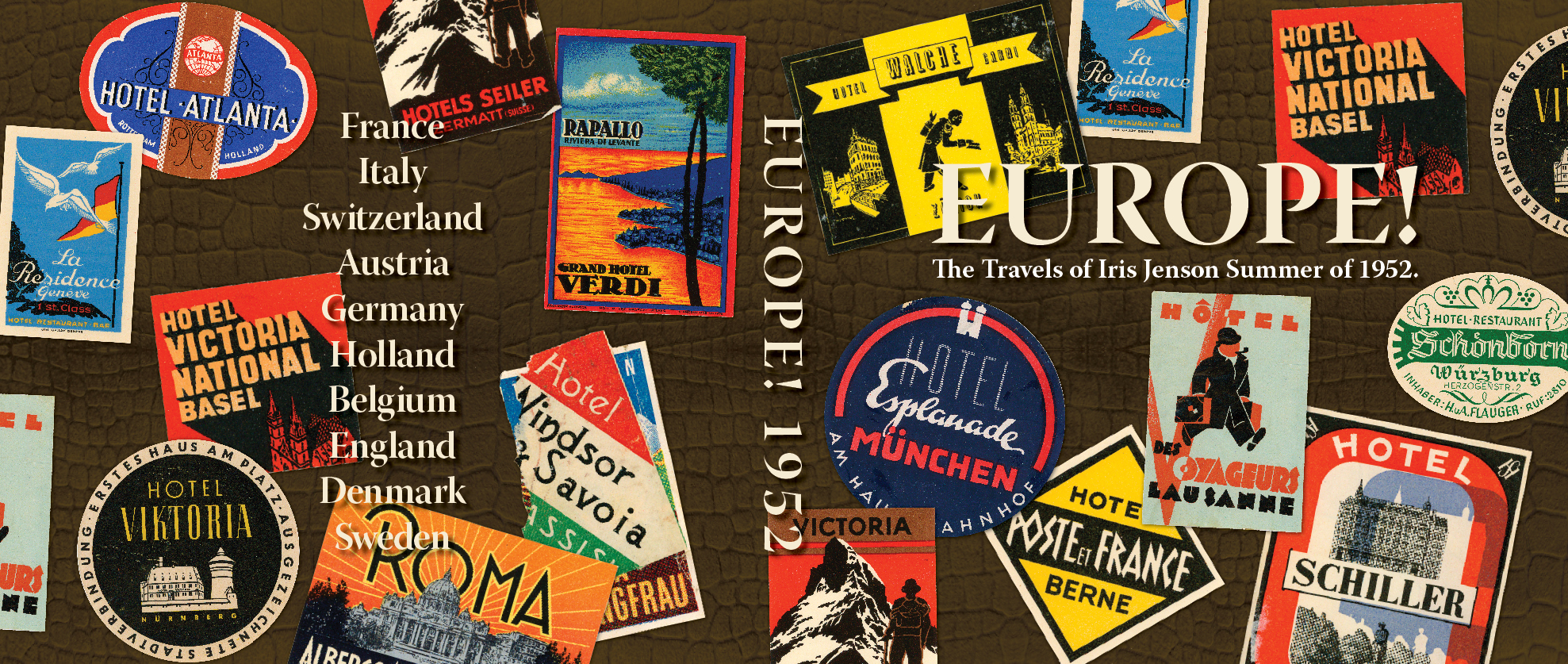
Europe 1952 – Cover

I hope that you have enjoyed this journey through Europe. I think I will miss these daily posts about my mother travels 60 years ago. For the next few weeks I’ll post on Tuesdays some of the “how to” of putting this book together. Today I’ll start with the cover.

Europe 1952 Front Cover

I wanted this cover to look like a small suitcase that I remember growing up, that my mom used on this trip. It was brown with an alligator texture and it had stickers from different places in Europe all over it. I originally thought I’d take a picture of the suitcase. But getting access to it wasn’t very convenient and when I found that my mom had extra stickers from her trip I decided that replicating it would probably get better results.

Crocodile Texture

The first step was to find an image of an alligator texture. I ended up with a crocodile texture instead that I found at Lee Dyeing Company. It was perfect. They had an alligator texture too but the crocodile was more like the original suitcase.

original scan on left – converted to png on right

The next step was to scan in all the stickers. Then I erased the background and converted them to png files so that the background was transparent. I did this in Photoshop.

Now with the parts and pieces I needed gathered together it was time to make the cover. I used blurb’s template for Adobe InDesign to get the size right for my book. They now have a handy plug-in for InDesign instead of template. It takes into account not only the size of the book and the number of pages but also the type of paper it is printed on. When making the cover it is just one page that includes the front, spine and back cover along with the bleeds for wrapping the cover. The template shows you were these things are on the page. I love the image wrapped cover the blurb offers. I’ve tried the paper back and it looks good but it just isn’t very durable. They also offer a dust jacket option but I’ve never been tempted to try it.

cover with crocodile texture

I placed the crocodile texture first. It was large image but not long enough for this cover so I copied and flipped the image horizontally. Then placed another copy next to that to give me enough image to cover the page horizontally. I copied all three of those and flipped them vertically to finish covering the page. Otherwise I’d risk too low of  resolution and ending up with a poor quality image.

crocodile texture with brown overlay

Now I had my texture but not the desired color. So on another layer I made a box large enough to cover the entire cover and filled it with brown. I used Pantone 7519 PC. Then I changed the transparency in the effects pallet to multiply. That made it so the crocodile texture came through. I was getting rather excited at this stage because how much it was looking like my mother’s suitcase.

cover with stickers added

Next I was ready to place the stickers. This took some trial and error to get a good balance in color and shape. I also kept in mind where I would be putting the text on the front, spine and back. As you can see I used some of the stickers more than once. But since they are on the front and the back I doubt that anyone has noticed on the finished book.

small drop shadow added to the stickers

To add just a bit of depth to the stickers the next step was a drop shadow. I’m not sure that you can see it here. Instead of the default 7 pt. drop shadow these are just 1 pt. in offset on both the x and y axis.

cover with text

The next step was to add the text. The cream color and font (Warnick Pro) are consistent with what I used for the inside of the book. At this point I realized that the cover was too busy. The drop shadow on the text helped make it more readable but it wasn’t enough. So I added a box around the title text on the front and changed the main title to red. I also put a stroke on the box, inspired by several of the stickers. Along with a larger drop shadow.

cover with box around title

This was a big improvement and I thought I was done. But when it came back to it later I decided it was still too busy. How could I fix it? I was not willing to give up on the concept of replicating my mother’s suitcase but I was not happy with all between the stickers and the title both front and back. So I decided to tone down the stickers. I took a black box large enough to fill the cover. I placed it under the text but over the stickers. Then after experimenting the transparencies I figured out that at 36% and using the darken effect I got the stickers toned down so they didn’t compete with the title. Yeah! The design now worked.

finished cover

Next week I’ll go over how I designed the layout for the inside of the book and using master pages in InDesign. What fun covers have you seen or designed yourself? I’d love to hear about them.

My Current Projects: Goals and Progress

Evaluate Goals for last week:

++ print goals for the week – complete
++ post at least once per day, Monday to Saturday – I want to get more posts done on other people’s work, but I didn’t get that done.
++ send reference images to Kim for the Horizon – I sent some images and links to Kim, plus I talked to her about the illustration and I think that was helpful.
++ finish adding links to blog – I got this done, I’m not all that happy with the way I have some of this set up but it will do for now.
++ finish Casey’s book – I got it uploaded, ordered and even got it back! Good job Blurb.
+    Send info on MS Sibijak – I almost gave up on this goal, then I decided I could upload all the images I have of the Sibijak to my SmugMug site and send off a link. I got them uploaded but haven’t composed the email yet with some historical information.
–    2 hours on Key West Audio transcribing – zilch on this.
+10 rate my progress

Progress on projects not on my goal list:

I got several of the Europe 1952 posts – 60 Years Ago Today – done ahead.

Goals for this week:

  1. print goals for the week
  2. post at least once per day, Monday to Saturday
  3. Send info on MS Sibijak
  4. talk to my dad about the Key West Audios – I need a different tactic
  5. Get Volume 6 – Our Family moving forward again
  6. rate my progress

Still struggling to get more done in a day. Do I just need more focus? Am I wasting too much time? Not sure the answer but hoping for inspiration. So much to do and I don’t think I’m making enough progress. Any suggestions?

Blurb – my favorite for self publishing

I’m a huge fan of Blurb.com! I have published more than a dozen books with them and I will continue to use them in the future. Blurb has 7 different sizes of books. My favorite is the 7×7. It makes such a nice compact book for those not huge projects. I also prefer the ImageWrap for the binding. It gives you a very durable cover plus the ability to have any kind of image or design on the cover you would like. If you haven’t used them before I highly recommend them. I’m grateful to a neighbor who told me about them a few years ago.

Remember Me

Last week I happened across “Remember Me” by Lesley Graham on Blurb. She uses a very collage style to illustrate the book that is very effective in telling this story. The book is about her grandfather who is losing his memory and his journey. I’m inspired by her work and will keep it in mind for future projects. Blurb has a cool preview feature that lets you see the entire book or just a few pages depending on how you set it up.

You can save 20% on two books with the promo code MOMRULES until May 2, 2012*.

*Offer valid through May 2, 2012 (11:59 p.m. local time). A 20% discount is applied toward your product total with a minimum order of 2 units or more. Maximum discount is USD $150, GBP £75, EUR €100, CAD $150, or AUD $150 off product total. Valid for printed books only. This offer is good for one-time use, and cannot be combined with volume discounts, other promotional codes, gift cards, or used for adjustments on previous orders.